Labour and work planning for warehouses, DCs and 3PLs

Labour planning that learns your warehouse.

LabourHero analyzes your WMS transactions to learn what your operation can really do. It forecasts the labour you need to get the work done, and shows you where to improve.

Built and tested on a working model of a distribution centre. No time studies. No new hardware.

At the pretend warehouse70,180 tasks · 3 weeks of scans
  1. Learns what the operation can do

    189 cases an hour

    Typical case picking. Its own best people: 232.

  2. Forecasts the labour the work needs

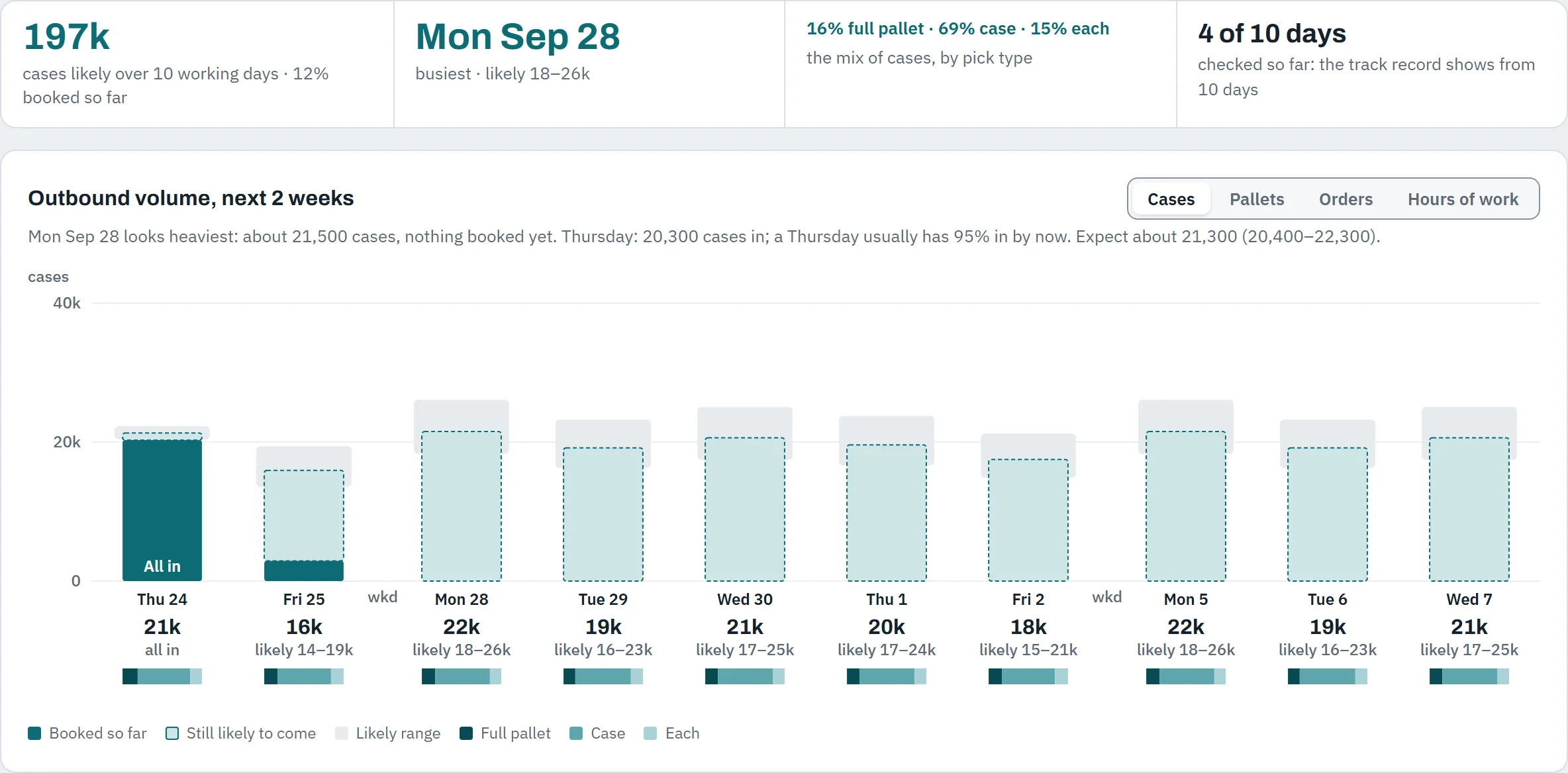
    21,300 cases on Thursday

    Likely 20,400 to 22,300, from what’s booked and the usual pattern.

    • 7 case pickers
    • 2 full-pallet pickers
    • 3 loaders
  3. Shows where to improve

    15.3 h to gain in one Days shift

    At its own best pace, about $454. And zone D picks 28% fewer cases an hour than zone A.

Real numbers from LabourHero running on the pretend warehouse. Yellow marks are targets: the pace its own best people already hit.

You already know the shift. You just find out too late.

  • Nobody can say what the floor can really do: the standards are guesses, or years old.
  • Tomorrow’s crew is planned on a spreadsheet and experience.
  • At 1 p.m. you find out the 4 p.m. load still needs five hours of picking.
  • The agency wants notice you can’t give, and the stand-up runs on yesterday’s guesses.

Traditional warehouse labour management software wants engineered standards: industrial engineers, stopwatch studies and a project that takes months. Most mid-sized sites don’t have the engineers or the months.

Warehouse labour planning in three steps

  1. 1

    Connect

    Your WMS or ERP sends its activity log and orders to LabourHero through its API. A small connector runs inside your network and only sends out. Your integration platform can send instead. No firewall openings, no file exports.

  2. 2

    Learn

    LabourHero builds labour standards from WMS data: your site’s own scans. For every task type, zone and weight band it learns two paces: the typical pace, to plan with, and the achievable pace your best people already hit, for targets and coaching. Lunches and breaks are matched and excused.

  3. 3

    Forecast, plan and improve

    It forecasts the work and the crews it needs days ahead, plans each day load by load against the trucks, and every shift report shows where the hours went and where to improve. On the floor, a one-tap coach turns long pauses into a conversation, not a write-up.

Learn, forecast, plan, improve. Every step is a screen you can see in the demo.

1 · Learn

Learns what your operation can do.

LabourHero analyzes every transaction your WMS records and learns what your operation can really do: the typical pace for each task type, zone and weight band, to plan with, and the achievable pace your own best people already hit, for targets and coaching. It finds the slow zones, the slow items and the people still learning, and every number shows what it was learned from.

No stopwatch studies and no six-month project: the standards come from your own scans and stay current, shift after shift.

Learned pace · an hourPretend warehouse
JobTypicalTypical against the best peopleBest people
Case picking25,197 picks · 11 people189 cases232
Full-pallet picking1,315 picks · 3 people15.1 pallets18.2
Loading11,122 pallets · 6 people33 pallets36.5
Receiving9,136 pallets · 7 people40 pallets43.5
Putaway9,076 pallets · 7 people28.6 pallets31
Replenishment3,061 moves · 2 people22.2 moves28.1
Case picking is also learned by zone, weight band and pick type. Yellow marks: the pace the site’s own best people already hit.

2 · Forecast

Forecasts the labour the work needs.

From the orders already booked and your usual pattern, LabourHero forecasts each day’s work for the next two weeks, in cases, pallets, orders and hours, with honest ranges. Then it turns the work into the crew each job and shift needs: who to bring in, in time for the agency’s notice, who to move, and who isn’t needed on any job.

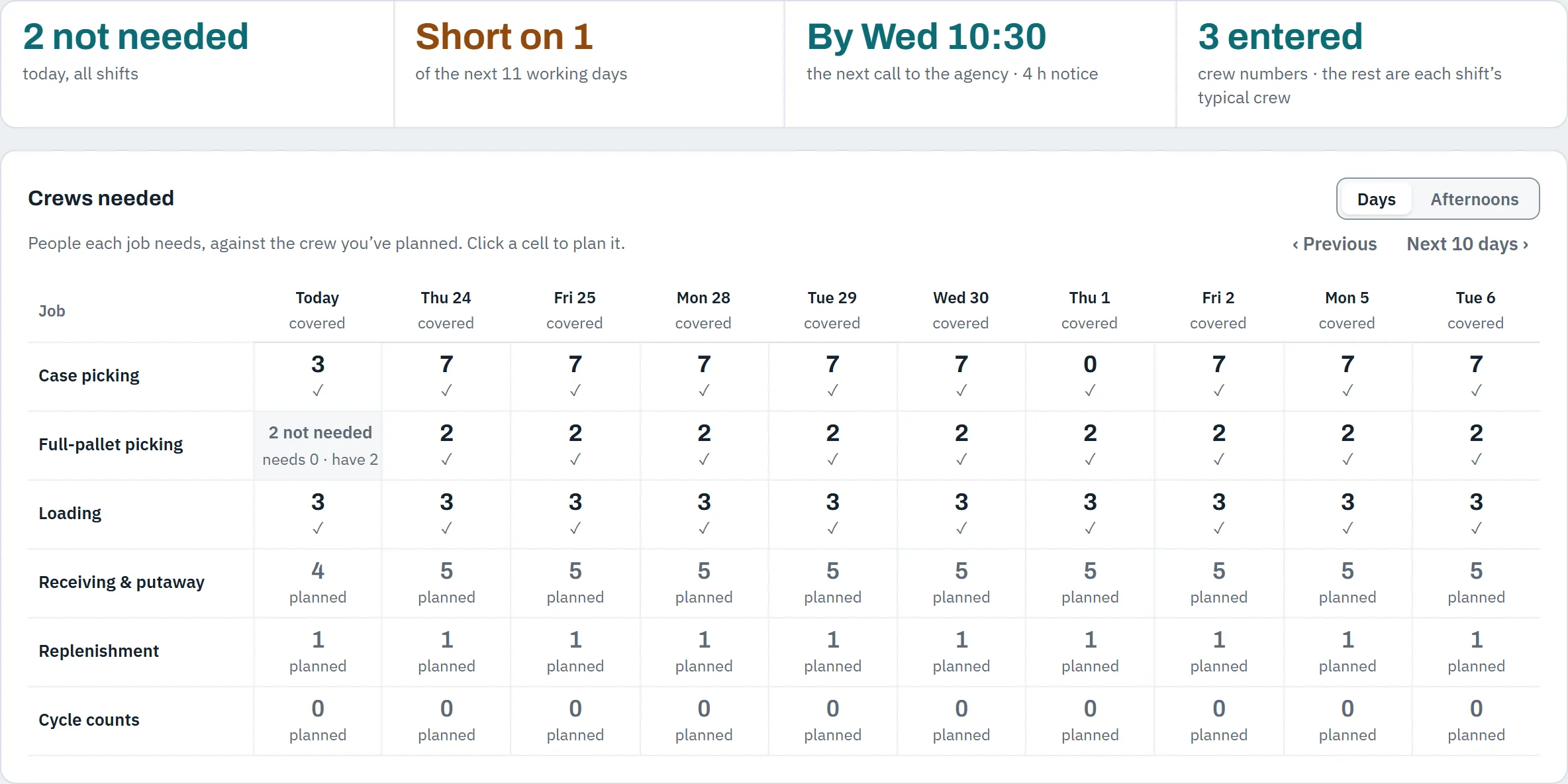
7case pickers for Thursday’s Days shift, for about 21,300 cases (likely 20,400 to 22,300).

Forklift and case pickers are planned as separate crews, because they are.

People · crews needed · from Wed 23 SepPretend warehouse
The crews grid: people each job needs per day for the next ten working days, against the crew planned. Today, 2 full-pallet pickers are not needed on that job.
  1. The next call to the agency, in time for its notice.
  2. Today: 2 full-pallet pickers not needed on that job, free to move.
Next 2 weeks · outbound volumePretend warehouse
Outbound volume for the next ten working days, each day as booked so far plus a likely range.

The next two weeks of volume per ship day, with ranges: cases, pallets, orders and hours.

3 · Plan the day

Plans the day against the trucks.

Work planning load by load against each done-by time: % picked, what was picked ahead, hours left at your learned pace, pallets, and the expected finish as a range, not a guess. When a load is at risk, LabourHero suggests which pickers to move from loads that can spare them, and each of those loads still makes its own time.

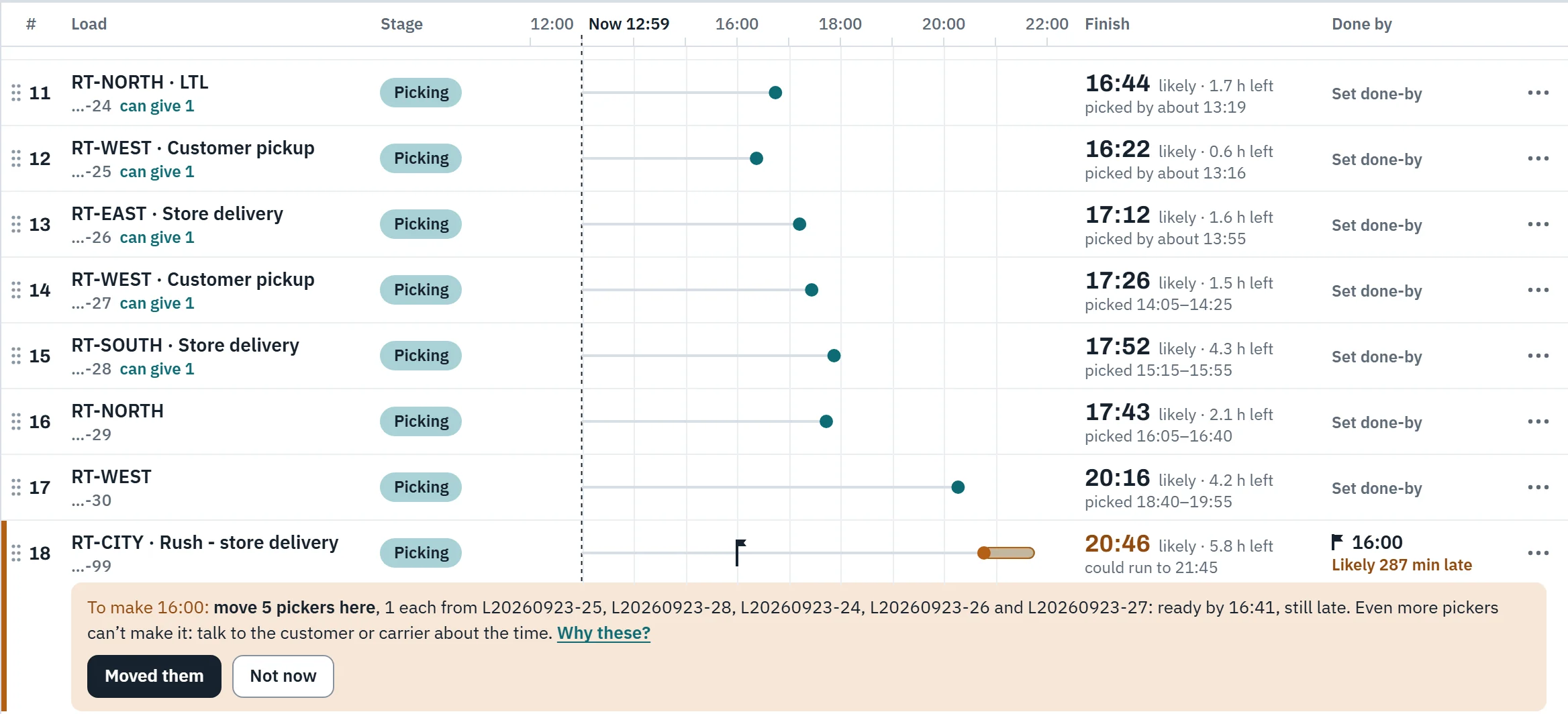
At 12:59, for a rush load due out at 16:00: “To make 16:00: move 5 pickers here, 1 each from five loads: ready by 16:41, still late. Even more pickers can’t make it: talk to the customer or carrier about the time.” Three hours’ notice instead of a surprise at four. The supervisor taps Moved them or Not now, and LabourHero learns from the answer.

Loads board · Wed 23 Sep · 12:59Pretend warehouse
The loads board: loads 11 to 18 in the order of work. Five loads are tagged “can give 1”. The rush load, …-99, is due at 16:00 but likely loaded at 20:46, 287 minutes late; the suggestion under it reads: to make 16:00, move 5 pickers here, 1 each from five loads: ready by 16:41, still late; even more pickers can’t make it, so talk to the customer or carrier about the time.
  1. Now, from the latest scan.
  2. Loads that can spare a picker and still make their own time.
  3. The rush load, in plain words: what it takes, and when no number of pickers will do.

4 · Improve

Shows you where to improve.

Every shift gets a plain report: utilization and efficiency as two separate measures, the hours you’d gain at your own best pace, the slowest jobs, and the pauses worth a conversation. The 10-minute stand-up sheet and the action list turn them into fixes.

Utilization75.8%time on the gunof available hours
Efficiency99%against the learned pacetarget 117%: the pace of the site’s top quarter

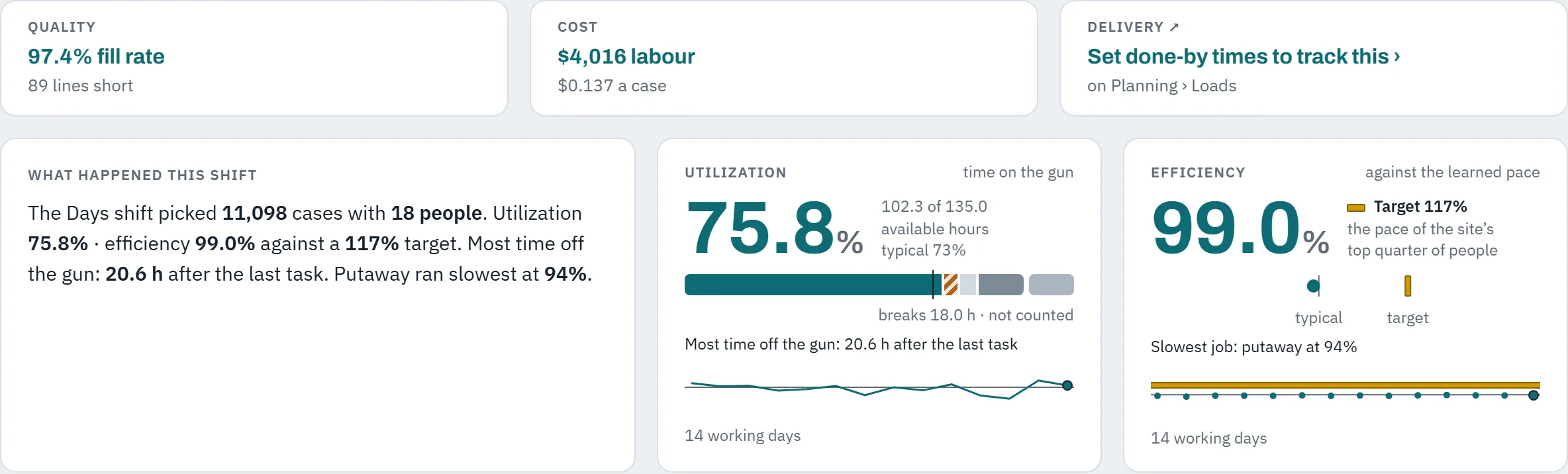
One Days shift on the pretend warehouse: 15.3 hours to gain at its own best pace, about $454. Two separate measures, never multiplied into one score.

Daily shift report · Days · Tue 22 SepPretend warehouse
The daily shift report summary: quality 97.4% fill rate, cost, utilization 75.8% and efficiency 99.0% in two separate panels, with a target of 117%.
  1. Utilization: time on the gun.
  2. Efficiency: against the pace learned from your own scans.
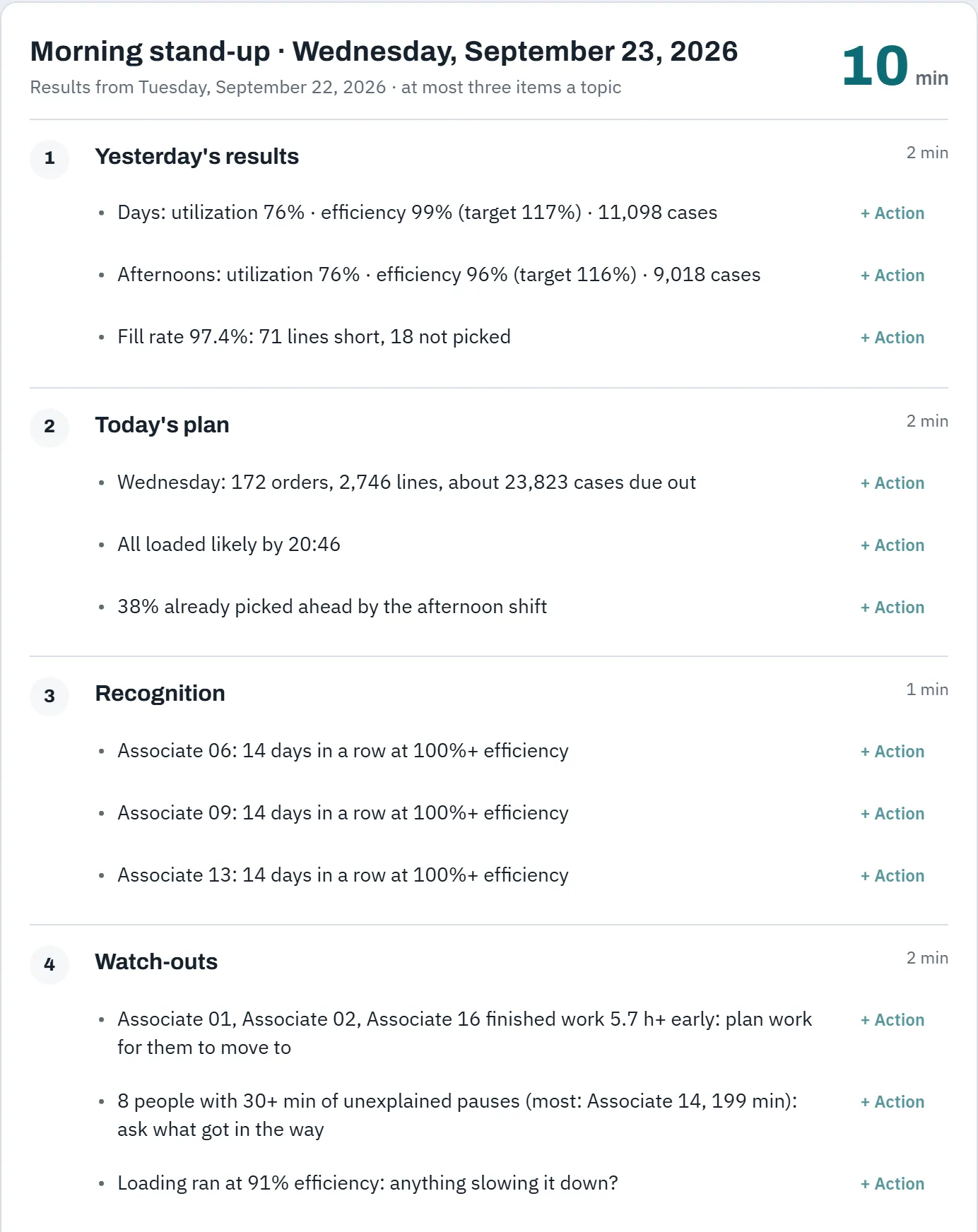
Morning stand-up · Wed 23 SepPretend warehouse
The morning stand-up sheet: yesterday’s results, today’s plan, recognition, watch-outs, actions due, quality and safety, in ten minutes.
  1. Ten minutes, with a presenter mode for the meeting.

5 · Coach

Coach, don’t reprimand.

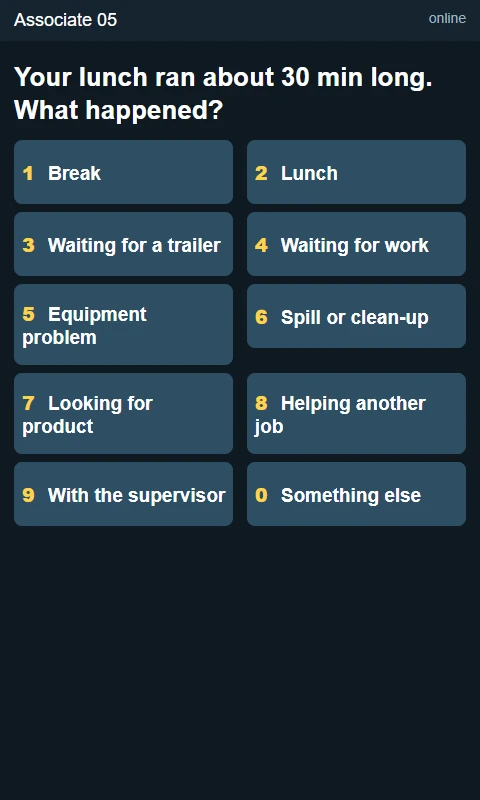
After a long pause, the coach asks one question on the forklift or scanner screen, answered with one tap, and it recognises good work too. The answers feed the stand-up and the action list, so obstacles get fixed instead of people getting blamed.

“Your lunch ran about 30 min long. What happened?”

Waiting for a trailer · Waiting for work · Equipment problem · Looking for product · and six more

Pauses beyond lunch and breaks are “potential gaps” to talk through, judged against each task’s own expected time.

The live coach on a vehicle-mount terminal: “Your lunch ran about 30 min long. What happened?” with ten numbered one-tap answers, from Break and Lunch to Waiting for a trailer and Equipment problem.
The live coach on a vehicle-mount terminal. One question, ten one-tap answers.

6 · Your data

Your data stays yours.

The connector inside your network only sends out, and it can mask employee names and IDs before anything leaves. LabourHero never takes prices, costs, order values, customer addresses or contacts, or wage rates.

An order arrives with its number, customer code, ship date, load and lines. Its price, its value and its ship-to address stay in your WMS.

Sent

Order number, customer code, ship date, load and lines.

Stays in your WMS

Its price, its value and its ship-to address.

Built for the floor, not the boardroom

  • Runs on the scanners you have.

    The live coach is a tiny page that works on old vehicle-mount terminals.

  • Keeps working in Wi-Fi dead spots.

    Answers wait on the device and send when it’s back in range.

  • One tap, no chat.

    One question after a long pause, a capped number per hour, and recognition for good work.

  • Coach, don’t reprimand.

    Long pauses are “potential gaps” to talk through, judged against each task’s own expected time. Lunches and breaks are excused automatically.

  • Fair to people.

    No red on anyone’s report. The shift note uses codes, never names. Targets come from what your own best people already do, not from a stopwatch.

  • Ready for your monitoring policy.

    LabourHero adds no cameras or trackers; it reads the scans your WMS already records. That makes the written electronic-monitoring policy Ontario requires of employers with 25 or more employees simple to write honestly. A policy template comes before go-live.

What we take, and what we never take

SentWe take

  • The activity log: who scanned what, where, when
  • Orders and lines, with ship dates and loads
  • Items with case and pallet sizes and weights
  • Locations and zones
  • Employee codes (names optional, masked if you choose)

Never sentWe never take

  • Prices, costs, order values
  • Customer addresses and contacts
  • Wage rates

They stay in your WMS.

  • Outbound only. The connector sends out over HTTPS. Nothing reaches into your network.
  • Names optional. Mask names and IDs before anything leaves your site.
  • Your data walled off. Each customer’s data is separated inside the database, and it fails closed: a query that doesn’t say whose data it is gets nothing.
  • Every change logged. An append-only audit log of sign-ins, settings and user changes.
See how it’s protected →

For your IT team

LabourHero connects by API to any WMS or ERP that can share its activity log and orders. Three ways to connect, outbound HTTPS only, one key per data source that we store only as a fingerprint, and a field-by-field list of everything we take.

Security in place today: each customer walled off in the database, least-privilege database roles, sessions that time out, lockout after failed sign-ins, an append-only audit log and a strict content security policy. What’s still to come before the first customer goes live is listed openly on the security page.

Read the IT docs

Become a founding site

LabourHero is built and tested on a working model of a distribution centre. Now we’re looking for a few warehouses, DCs and 3PLs, Canada first, to be its first real sites.

What your site gets

  • LabourHero set up on your own data, with us beside you.
  • Your supervisors walked through it on your own floor’s numbers. [owner to confirm]
  • A direct line to the people building it, and a say in what comes next.
  • Founding-site pricing: [PRICING: owner to decide]

What we ask of you

  • A WMS or ERP with an API that shares the activity log and orders (we check this with you before anything is signed).
  • Read-only access, our connector on a small server, or a feed from your integration platform.
  • About 13 weeks of history (4 at the least).
  • An hour or two with someone who knows your WMS codes.
  • Supervisors who’ll use it and tell us honestly what works.

The honest timeline

  1. 1

    A readiness check of your WMS’s API, before any contract.

  2. 2

    Connect, and load your history.

  3. 3

    Map your codes and set up your shifts, lunches and breaks.

  4. 4

    A readiness report you review with us.

  5. 5

    One to two weeks of live data while we check every forecast against what really happened.

Some go-live work is still ahead of us, including hosting in Canada, and we finish it before your site goes live. We give you dates after the readiness check, not before.

Become a founding site

Questions sites ask

Does LabourHero replace our WMS?

No. Your WMS keeps running the warehouse. LabourHero reads what it already records and adds the planning and coaching on top. It’s warehouse labour management software that works beside the WMS, not instead of it.

Which WMS does it work with?

Any WMS or ERP that can share its activity log, orders, items, locations and employee codes through an API. Each vendor needs an adapter, and we only list a WMS as supported once its adapter is built and tested. Any integration platform that can send JSON over HTTPS can feed LabourHero today. It doesn’t read file exports.

How long until it’s useful?

It learns from the history your WMS already keeps. Once about 13 weeks are loaded and your codes are mapped, the first standards and reports come from that history. Then one to two weeks of live data while forecasts are checked against what really happened. Until there’s enough history, ranges are wider and labelled as early estimates.

Is this surveillance?

No. LabourHero adds no cameras and no trackers. It reads the scans your WMS already records, excuses lunches and breaks, and calls anything beyond a “potential gap” to talk through. It’s built to coach, not to reprimand, and the plain-English shift note uses codes, never names. In Ontario, employers with 25 or more employees need a written electronic-monitoring policy; LabourHero makes yours simple to write honestly.

Where is our data?

In LabourHero’s cloud service, walled off from every other customer’s data inside the database. Hosting in Canada is planned before the first customer goes live. Prices, costs, order values, addresses, contacts and wage rates are never taken, and employee names are optional.

Does it use AI?

The standards, forecasts and reports are statistics worked out in LabourHero’s own code, from your own data. One optional feature, the plain-English shift note, is written by Claude, Anthropic’s AI model. It receives only numbers LabourHero has already calculated, with people as codes, never names.

What does it cost?

[PRICING: owner to decide]

Do supervisors need training?

It’s built for supervisors: the loads board, the crews grid, the shift report and the stand-up sheet use their words, and the stand-up sheet has a presenter mode for the morning meeting. For founding sites, we walk your supervisors through it on your own data. [owner to confirm]

Book a demo, or become a founding site

Tell us about your site. We reply personally: a short call, then a demo on the pretend warehouse.